
You hired someone you trust to look after the most important people in your home — but trust and verification are two different things. A nanny cam isn’t about suspicion; it’s about having a record when something doesn’t add up, and peace of mind on the days everything seems fine. The best ones work because they’re invisible — disguised as objects that already belong in the room, recording without drawing a second glance. If you’re ready to stop wondering and start knowing, the products below are a solid place to start.



Resolution matters more than you think. A blurry image is nearly useless when you actually need to review footage. All four cameras on this page record in 1080P HD — that’s enough clarity to read expressions, identify objects, and document what actually happened in a room. Don’t settle for 720P if you can avoid it.
Built-in DVR vs. cloud or SD card. Every camera here uses a built-in DVR, which means recordings stay local — no monthly subscription, no cloud account to manage, no footage stored on someone else’s server. For home monitoring situations where privacy matters, that’s a meaningful advantage over connected cameras that upload to the internet.
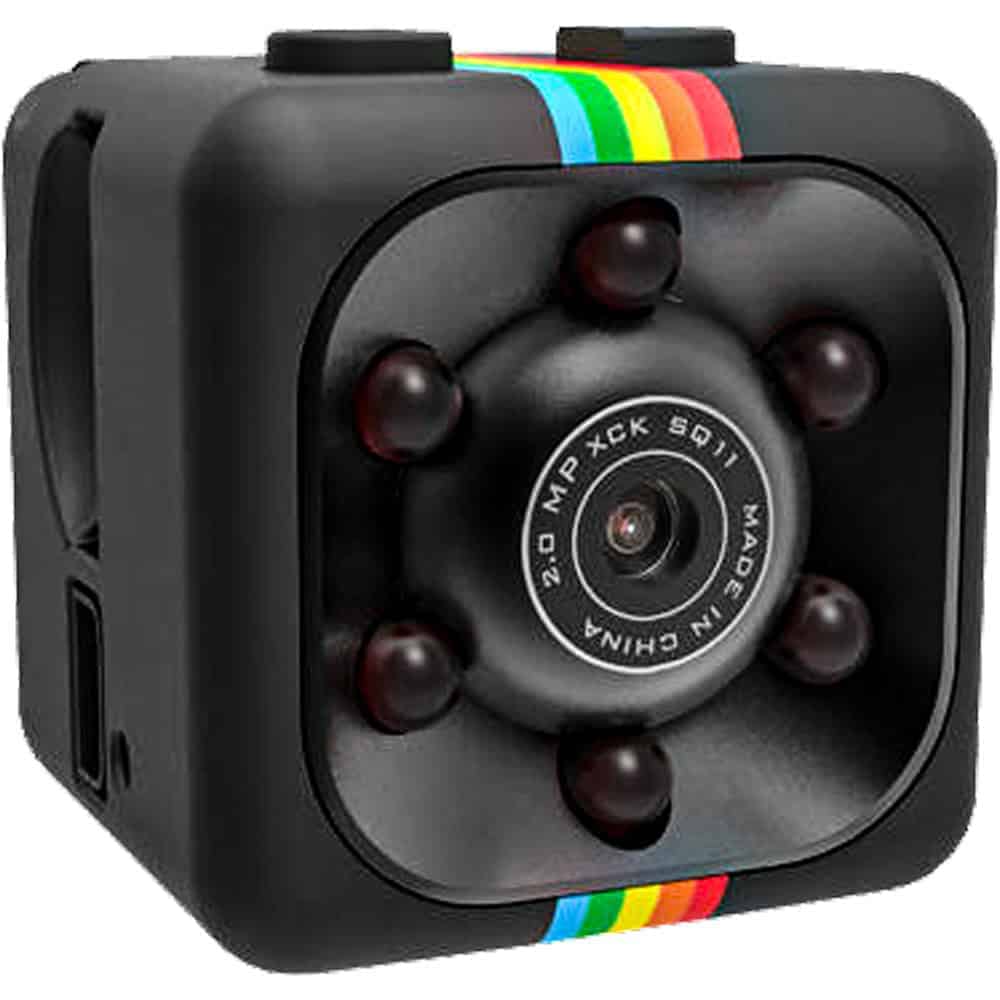
Motion activation vs. loop recording. The Mini Hidden Camera and USB Charger Camera both support motion-activated recording, which saves storage and makes it easier to find relevant footage without scrubbing hours of nothing. Loop recording — where the device overwrites old footage automatically — is useful if you want continuous coverage without managing files manually. Understanding the difference helps you match the camera to how you actually plan to use it.
Disguise quality is the whole game. A nanny cam that looks like a camera defeats its own purpose. The USB charger camera works because phone chargers are in every room and no one thinks twice about them. The cross camera works because decorative wall pieces are invisible to people who didn’t put them there. Choose a disguise that genuinely belongs in the room where you need coverage — not one that feels out of place.
Portability vs. fixed placement. The HD Pen Camera is the only truly portable option here — you can move it between rooms, take it to a different location, or position it quickly without mounting anything. The others are better suited to a fixed spot. If your monitoring needs shift room to room, portability may be more valuable than a permanent installation.
Position for the angle you actually need. Most people set up a nanny cam and point it at the middle of a room — then discover the relevant activity happened just outside the frame. Before you commit to a placement, sit where the camera will sit and mentally map what it will actually capture. Cover entry points, play areas, or wherever a caregiver spends the most time with your child or elderly family member.
Know your state’s recording laws before you start. In most states, recording video in your own home is legal, but audio recording without consent laws vary and can be more complicated. This isn’t a reason to skip home monitoring — it’s a reason to know the rules before you use one. See our Laws & Restrictions page at https://varietyproducts.com/law-and-restrictions/ for a state-by-state overview relevant to hidden cameras and recording devices.
Test your footage before you rely on it. Run a test recording in the actual placement location, in the actual lighting conditions you’ll have during monitoring hours. Check the footage on a screen before you assume everything is working. Lighting changes dramatically between day and night, and what looks clear in a bright room may be unusable in dim afternoon light.
Keep access to your footage private. If footage is stored on a local DVR or SD card, treat it like any sensitive file — secure the storage media and limit who knows the camera is there. The value of a nanny cam is in the record it creates. That record only helps you if it stays intact and unaltered.
A: The most effective placement depends on where your caregiver spends the most time with your child or family member. Common choices include the living room, playroom, or kitchen — anywhere primary caregiving activity happens. A disguised camera like the USB Charger Hidden Camera works well near an outlet in a main living area, since phone chargers are expected there and won’t draw attention. Avoid placing cameras in bathrooms or bedrooms where people have a reasonable expectation of privacy, which can create legal issues in most states.
A: In most U.S. states, recording video in your own home is legal, even without notifying a caregiver, as long as the camera is in a common area and not in a private space like a bathroom. Audio recording is where it gets more complicated — some states require at least one-party or all-party consent for recorded conversations. The rules vary enough by state that you should check before setting up any recording device with a microphone. See our Laws & Restrictions page at https://varietyproducts.com/law-and-restrictions/ for state-specific guidance on home recording laws.
A: That depends on your state’s laws and your own judgment. In most states, you’re not legally required to disclose a video-only camera in a common area of your own home. Some employers choose to disclose anyway — it sets a professional tone and can actually deter problems before they start. If your camera records audio, disclosure requirements are stricter in many states. Either way, knowing the legal baseline for your state before making that call is the right first step.
A: A traditional security camera is visible by design — the goal is deterrence, and people can see they’re being recorded. A nanny cam is covert by design, disguised as an ordinary object so it captures natural behavior rather than performance. The USB Charger Hidden Camera, Mini Hidden Camera, and Cross Hidden Camera on this page all record without any indication that recording is happening. If you want both deterrence and documentation, a visible security camera and a covert nanny cam serve different purposes and some households use both.
A: Cameras with built-in DVRs typically store footage on an internal memory chip or a micro SD card, which you access by connecting the device to a computer via USB. The footage files are usually standard MP4 video that plays in any media player — no special software required. Motion-activated models like the Mini Hidden Camera make reviewing easier because the recordings are event-triggered rather than hours of continuous footage. Check the storage capacity of your device and set a regular schedule to review and back up recordings so nothing gets overwritten before you’ve had a chance to check it.
Every home and monitoring situation is a little different — if you're not sure which camera fits your space or needs, reach out through our contact page and we'll help you figure out the right fit.
Shop All Hidden CamerasEXCLUSIVE OFFER
Every order – not just your first!
Unlock Your Discount Instantly
Enter your email below and your personal 15% discount code appears right here – no need to check your inbox.
🔒 We respect your privacy. Unsubscribe anytime.
YOU’RE IN!
Use this code on every order
🎉
Here’s Your Code!
Use it now an on every future order.
YOUR DISCOUNT CODE
We also sent this code to your email for safekeeping.